 AutoSplitter


Evolution of AutoSplitter
 Zoltán Péter
Published: October 27, 2026
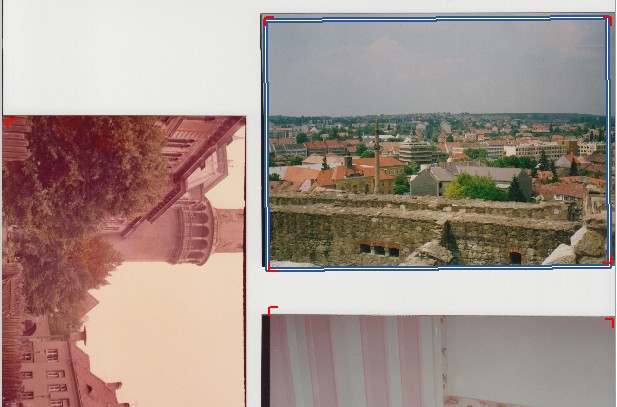
2012 - Detecting corners
When I started working on AutoSplitter, I had no real point of reference. The basic scanning software provided by my flatbed scanner's manufacturer was the only software I had tried, and it was seriously lacking.
I was motivated to create something better, and my only test setup was my own scanner and my own family photos. These photos weren't glued into a yellowed photo album; they were just a bunch of photos lying in a cardboard box.
So I assumed that scanning photos against the whitish background of a flatbed scanner would be the only use case for almost everyone.
This inspired the first iteration of my photo-detection algorithm. The task seemed obvious: given a scanned image containing multiple photos, find the photos by identifying which pixels belong to a photo and which belong to the scanner bed. All photos are rectangular, with (mostly) sharp corners. Around a photo's corner, 25% of the neighboring pixels will be part of the photo and 75% will be background. The background will usually be nearly white, while the photo's content will generally be far from white.
Evaluating groups of pixels according to that logic will reveal corners—most of the time. Some detections will be false positives (not actually corners), and some will be false negatives (undetected corners). Detected corners can be easily classified as top-left, top-right, bottom-left, or bottom-right corners, depending on which segments around the corner pixel appear to be background and which appear to be part of a photo.
Two or three corners can be enough to determine a photo's location quite accurately. This approach worked quite well with my photo sets. Some undetected corners caused problems, such as multiple photos being mistakenly merged, but it was still much better than the factory software that came with my scanner.
As a side note, edge detection is another good way to find rectangular shapes in an image. I can't say it never played a role in my algorithms, but it was used only as a secondary aid for evaluating photo detections. It was never the main driver.
2019 - Squares and blocks... and corners
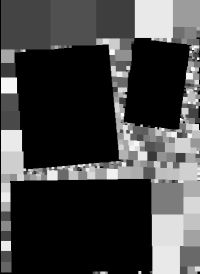
In fall 2019, after years of repeatedly trying to improve the automatic detection algorithm, I still hadn't made much progress. I had made some gains by fine-tuning the corner-detection method, but the improvements were never revolutionary. I had added multiple filtering layers to the corner-detection algorithm so it would work even when users didn't scan against a white background. This helped quite a bit, but not enough.
The next big development was the "squares method." In IT terminology, this is called connected-component labeling and convex-hull fitting. It's a fairly simple idea: label all the pixels in the input image as either background or photo using different filters, then find groups of pixels that all look like part of a photo. Join adjacent squares into groups; each group roughly outlines a detected photo.
This worked quite well with uneven backgrounds. I made the corner-detection algorithm much stricter so it would detect only obvious photos. The squares method then processed the remaining, undetected areas to find the other photos. Unfortunately, I couldn't figure out how to accurately detect the rotation angles of the photos, so they were always detected without rotation (at 0 degrees). Still, this was a big improvement over the corners-only approach.
Summer 2026 - Squares finally rotate
After many failed attempts to further improve my automatic detection methods, I finally managed to determine rotation angles for detected groups of squares. This prompted me to abandon square detection, since it was the root cause of many false positives and merged detections. However, once again, I couldn't improve the results any further.
Early fall 2026 - Deep learning
There was nowhere else to go. Squares and corners couldn't provide better results. No matter how much I fine-tuned the algorithm, one unavoidable fact remained: finding rectangular objects in an image is EASY. Figuring out which pixels belong to photos is hard—VERY hard. Everything depends on this simple binary classification of each pixel. It doesn't matter how well-tuned your rectangle-detection method is if you can't accurately identify which pixels belong to the rectangle, right?
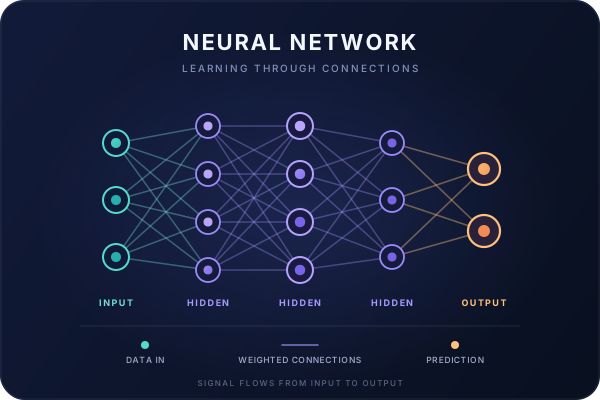
Deep learning uses neural networks—algorithms that mimic the human brain to some extent. Training neural networks requires a lot of sample data (and corresponding answers) to teach and evaluate the network. Training a photo-detection system for scanned images isn't easy. You can't find a truckload of scanned photos on the internet. I couldn't get them from my customers, either, since the software NEVER uploaded any scanned images, and customers certainly wouldn't approve of that kind of process.
Deep learning provides the holy-grail answer to the ever-important question: IS THIS PIXEL PART OF A PHOTO OR NOT? If you can answer this question reliably, a simple connected-component labeling algorithm (what I like to call "squares") can detect photos very reliably.
I've found a way to get enough sample data to train the neural network without compromising anyone's privacy. As a result, AutoSplitter has been able to detect photos very reliably since v1.16.1.
The future
At the moment, I don't know what's next. The training data probably needs to be refined to improve automatic detection further. The results certainly aren't 100% accurate yet, and probably never will be. In any case, if I see a way to improve them, I'll try.