 AutoSplitter


howto
Select or change scanner or resolution
Published: September 19, 2026
Scanner and DPI selection
After a succesful scan, AutoSplitter will always try to use that scanner and resolution again.
If you wish to change that, just click the black triangle under the Scan button or just click the Scanner/DPI button to launch a popup menu that lets you return to the scanner setup dialog.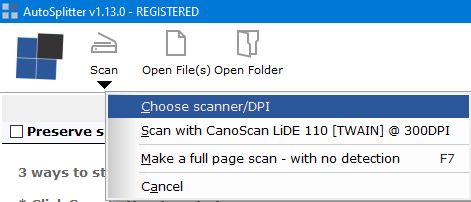 Starting from v1.13 you can select Brightness and Contrast when selecting the scanner.
Lowering your brightness by 5-10% can help to bring out more details from your photos.
Please be aware that these adjustments may affect accuracy of autodetection.
Starting from v1.13 you can select Brightness and Contrast when selecting the scanner.
Lowering your brightness by 5-10% can help to bring out more details from your photos.
Please be aware that these adjustments may affect accuracy of autodetection.
If you wish to change that, just click the black triangle under the Scan button or just click the Scanner/DPI button to launch a popup menu that lets you return to the scanner setup dialog.
Starting from v1.13 you can select Brightness and Contrast when selecting the scanner.
Lowering your brightness by 5-10% can help to bring out more details from your photos.
Please be aware that these adjustments may affect accuracy of autodetection.
To scan multiple photos at once, first choose a scanner interface that works reliably on your system. For troubleshooting, see scanner and file-load errors; for setup and detection advice, read the batch-scanning tips.